
How to Choose an AI Model
Creght's AI chat supports multiple models. They differ a lot in design ability, reasoning ability and credit cost — picking the right one saves both credits and rework.
This page explains what every part of the model card means, and which model to pick for which job. To see what one identical prompt actually produces on each model, see AI Model Comparison.
Where to switch models
The name of the model in use is shown at the bottom left of the AI chat input. Click it to open the model list, where each model is a card. Switching takes effect from your next message; the current conversation is kept.
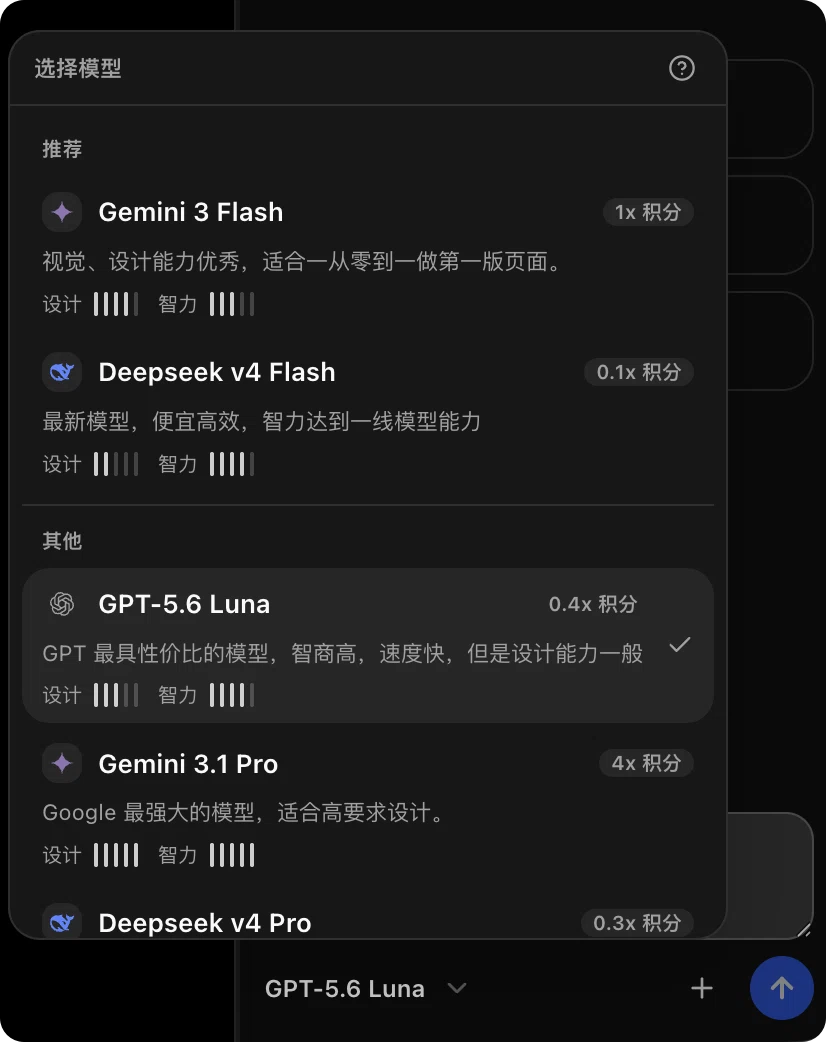
A red dot next to the model name means the list has changed — a model was added or removed, or a credit multiplier was adjusted. The dot disappears once you open the list.
Here is what each item on a card means:
| Item | What it means |
|---|---|
| Vendor icon and model name | Which vendor the model comes from, and its name in Creght. |
| N× credits | Cost relative to the baseline model. 1× is the baseline, 0.1× costs one tenth per call, 4× costs four times as much. |
| One-line summary | What the model is best at. This line alone is usually enough to choose. |
| Design | Visual quality: layout, spacing, colour, overall look of the page. |
| Intelligence | Reasoning: breaking down complex requirements, edits spanning several pages or sections. |
| Group heading | Models grouped by purpose so you can find one quickly, e.g. Recommended, Value, High performance. |
Design and Intelligence are 5-step meters — more filled bars means stronger. Models without a rating simply don't show these two lines.
Models listed under "Unsupported models" are greyed out; upgrade your subscription to use them.
Pick one in a sentence
| What you're doing | Suggested model |
|---|---|
| Building the first version of a page from scratch, visuals matter most | Gemini 3 Flash |
| Small edits: copy, images, spacing | Deepseek v4 Flash |
| Complex changes spanning several pages or sections | Deepseek v4 Pro |
| Instructions must be followed exactly, heavy copy rewriting | GPT-5.6 Luna |
The models
Gemini 3 Flash (1× credits)
Strong visual and design ability — the best choice for building the first version of a page from scratch. Prefer it for home pages and landing pages, where look and feel come first. It is the baseline for credit multipliers, so its cost is moderate.
Deepseek v4 Flash (0.1× credits)
A recent model that is cheap and efficient, with reasoning close to top-tier models. The cheapest option available: one call costs a tenth of the baseline. Best value for well-scoped small edits such as copy, images and spacing.
Deepseek v4 Pro (0.3× credits)
The higher-end Deepseek model. It costs more than Flash but is steadier on complex work that spans several pages or sections. Switch to it when Flash keeps getting an edit wrong, or when the request itself has several dependent steps.
GPT-5.6 Luna (0.4× credits)
An OpenAI model that is consistent at following instructions precisely and at rewriting content. Choose it when your request is very specific and you want it followed to the letter, or when rewriting long marketing copy.
A few rules of thumb
- Cheap first, expensive second. Try a low-cost model first and only re-run with a stronger one if the result isn't good enough.
- The smaller the change, the cheaper the model can be. Well-scoped edits usually come out right on a cheap model.
- The first draft deserves a good model. The structure and look of the first version affect every later edit.
- Switch models instead of retrying. When one model gets it wrong repeatedly, switching usually costs fewer credits than three more attempts.
- The multiplier isn't everything. Actual cost also depends on conversation length and task complexity — see AI Credits Guide for more ways to save.